Raajeev Bardhaan

Pelican iCaaS – Designing an AI-First Compliance Platform
Project Overview
Role: Lead UX Designer
Product: Pelican iCaaS (Intelligent Compliance as a Service)
Domain: AML, KYC, Sanctions, Alert Management, AI Agents (SaaS)
Platform: Web-based Enterprise SaaS
Timeline: Ongoing / Multi-phase
Project Overview
Pelican iCaaS is an AI-powered compliance platform used by banks and financial institutions to manage AML (Anti-Money Laundering), KYC, sanctions screening, and alert investigations across multiple jurisdictions.
The core challenge of this domain is scale and cognitive overload:
-
Thousands of alerts per day
-
High false-positive rates
-
Complex regulatory requirements
-
Decisions that must be explainable and auditable
As the Lead UX Designer, I was responsible for designing end-to-end user experiences across AML monitoring, alert review, and KYC & sanctions workflows. A major differentiator of this project was the Pelican AI Agent — a contextual, in-product conversational assistant embedded directly into compliance workflows to reduce cognitive load and improve decision-making.
My Role & Responsibilities
-
UX strategy and product discovery
-
User research with compliance analysts and SMEs
-
Information architecture and workflow design
-
Interaction design for complex, data-heavy systems
-
Designing AI-assisted experiences (Pelican AI Agent)
-
Wireframes, high-fidelity UI designs, and UX specifications
-
Cross-functional collaboration with product, engineering, and compliance teams
Understanding the Problem Space
Primary User Personas
-
AML Analysts: Investigate suspicious transactions and alerts
-
Compliance Officers: Ensure regulatory adherence and audit readiness
-
Operations Managers: Monitor workload, risk exposure, and performance
Key User Problems
-
Alert fatigue caused by extremely high false positives
-
Fragmented workflows across AML, KYC, and sanctions systems
-
Poor explainability of AI/ML-driven alerts
-
Heavy cognitive effort required to correlate data across screens
-
New analysts face steep onboarding curves due to domain complexity
UX Strategy & Design Principles
Before jumping into screens, I defined three guiding principles that shaped every design decision:
1. Reduce Cognitive Load, Not Information
Compliance users need clarity, not fewer data points. The UI must surface the right information at the right time.
2. Explain AI, Don’t Replace Humans
AI should support human judgment, not override it. Every AI outcome must be transparent and interpretable.
3. Zero Context Switching
Users should never leave their workflow to search for answers. Help, explanations, and insights must live inside the product.
Functional Area 1: AML Monitoring & Investigation
Problem
AML analysts face continuous streams of alerts generated from transaction monitoring systems. Most alerts are false positives, yet each one demands review. Analysts struggle to:
-
Prioritize which alerts matter most
-
Understand why an alert was triggered
-
Navigate across multiple screens to gather context
UX Goals
-
Enable faster triage of high-risk alerts
-
Provide immediate context without navigation
-
Make AI risk signals understandable and trustworthy
AML Dashboard Design
The AML dashboard acts as the starting point for analysts.
Key UX Decisions
-
Risk-based prioritization: Alerts are ranked by AI risk score
-
Visual summaries: Charts show alert volume trends and risk distribution
-
Contextual alert cards: Each alert shows reason snippets (not just IDs)
-
Progressive disclosure: Details appear only when needed
Anti Money Laundering UI Screens




Functional Area 2: Alert Review & Decision-Making
Problem
Alert review is a high-risk decision phase. Analysts must justify actions to regulators and ensure every decision is auditable.
Pain points included:
-
Fragmented alert details across tabs
-
Manual documentation of reasoning
-
Difficulty explaining decisions to auditors
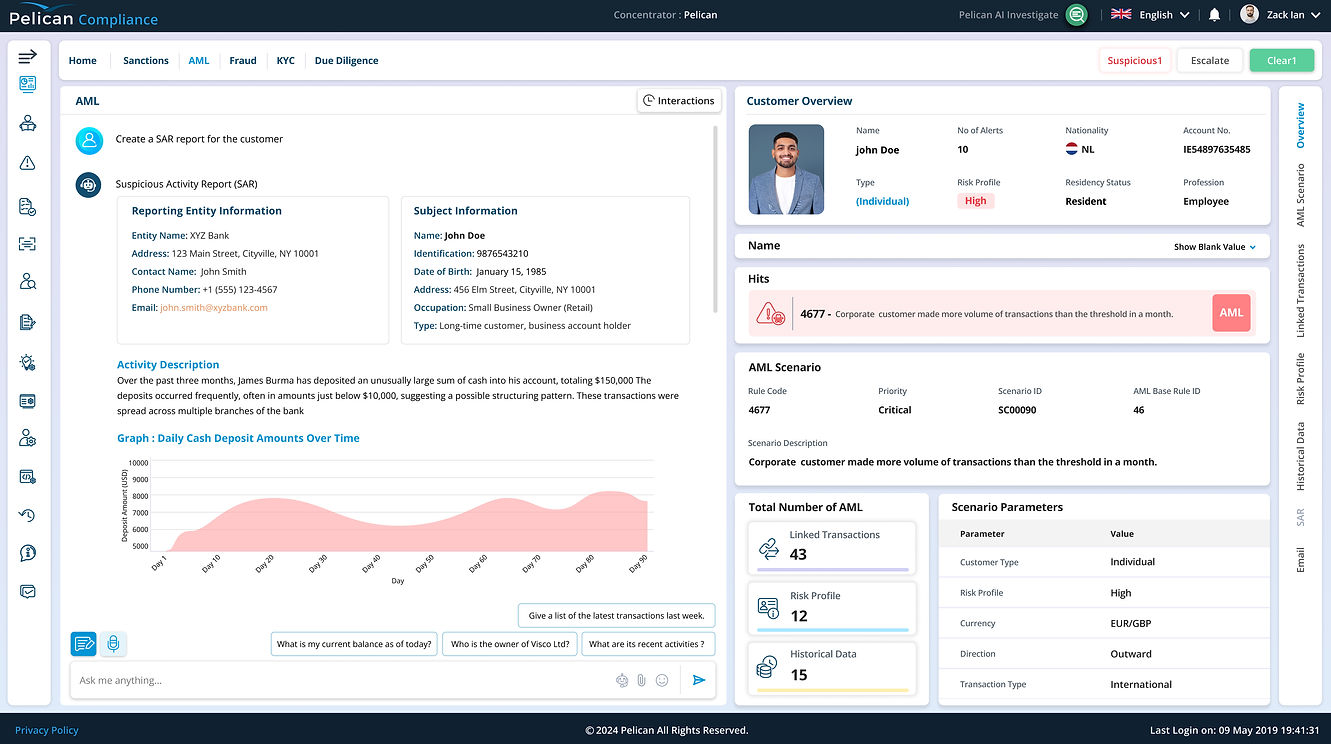
Pelican AI Agent in AML
The Pelican AI Agent is persistently available on AML screens as a context-aware assistant.
What the AI Agent Does
-
Answers investigative questions in natural language
-
Explains why an alert was triggered
-
Surfaces related alerts or customer behavior patterns
Example User Questions
-
“Why was this transaction flagged?”
-
“Show similar alerts for this customer.
-
“Is this behavior unusual for this account?”
UX Integration Decisions
-
AI opens in a side panel, not a modal, preserving context
-
Responses are structured, not conversational fluff
-
AI highlights data directly on the UI where relevant
Alert Review Workflow Design
UX Goals
-
Keep analysts in a single screen
-
Make decision-making faster and defensible
-
Ensure every action is logged and auditable
Key UX Solutions
-
Split-screen layout: Alert list + detail panel
-
Contextual tabs: Transaction, Customer, History, AI Analysis
-
Persistent action CTAs: Escalate, Dismiss, Flag
-
Built-in audit trail: All actions auto-logged
Pelican AI Agent in Alert Review
Here, the AI Agent acts as a decision co-pilot.
AI-Assisted Capabilities
-
Summarizes alert context across systems
-
Explains risk drivers in plain language
-
Helps analysts articulate reasoning for decisions
UX Design Highlights
-
“Explain this alert” CTA invokes AI explanation
-
AI output can be copied into case notes
-
AI avoids giving verdicts — human remains in control
Alert Review UI Screens


Functional Area 3: KYC & Sanctions Screening
Problem
Name screening and KYC checks are notorious for false positives and opaque logic. Analysts often don’t understand why a match exists.
Challenges
-
Ambiguous name matches
-
Poor confidence indicators
-
High manual effort during onboarding
KYC & Sanctions UX Design
UX Goals
-
Make risk understandable, not intimidating
-
Reduce false positives through better explanations
-
Speed up onboarding without sacrificing compliance
Key Design Decisions
-
Customer 360° view: Unified profile with risk indicators
-
Step-based onboarding: Guided KYC flow with progress indicators
-
Interactive sanctions results: Confidence levels + match breakdowns
Pelican AI Agent in KYC & Sanctions
In KYC, the AI Agent functions as a domain translator.
What Users Ask
-
“Why is this considered a sanctions match?”
-
“Which attributes triggered this risk?”
-
“Is this a partial or exact match?”
UX Decisions
-
AI explanations map visually to UI fields
-
Confidence levels are explicit (High / Medium / Low)
-
Suggested next actions reduce hesitation
KYC & Sanctions UI Screens


Why the Pelican AI Agent Was a UX Breakthrough
Instead of being a generic chatbot, the Pelican AI Agent was designed as:
-
A workflow companion, not a help widget
-
An explainability layer for AI decisions
-
A cognitive load reducer in high-risk environments
UX Impact
-
Reduced context switching
-
Faster alert resolution
-
Improved onboarding for junior analysts
-
Higher trust in AI-driven systems
Collaboration & Constraints
-
Worked closely with compliance SMEs to validate workflows
-
Ensured designs met regulatory and audit requirements
-
Balanced innovation with conservative enterprise expectations
UX Impact
-
Reduced context switching
-
Faster alert resolution
-
Improved onboarding for junior analysts
-
Higher trust in AI-driven systems
Reflection & What I’d Improve
If I were to iterate further:
-
Introduce personalization for AI Agent prompts
-
Expand proactive AI suggestions
-
Add role-based AI responses for different users
This project reinforced a key belief:
AI is not a feature — it is a new interaction paradigm.
Final Takeaway
This project demonstrates my ability to:
-
Design complex enterprise SaaS systems
-
Integrate AI agents meaningfully into workflows
-
Translate machine intelligence into human-centered UX
The Pelican iCaaS platform showcases how AI-assisted UX can transform compliance from a reactive burden into a proactive, intelligent system.
